Sending arguments to the build server
When you send a build to the server, you can provide more parameters. The server incorporates those parameters into the build process as build hints.
These hints are often called "build hints" or "build arguments." They behave like compiler flags that tune the build server’s behavior. That makes them useful for fast iteration on new functionality without rebuilding plugin UI for every change. They’re also useful when you need to expose low-level behavior such as customizing the Android manifest XML or the iOS plist.
Launch Codename One Settings from the Maven project root, then select Hints in the left navigation rail. The hints use the key=value style.
mvn cn1:settings
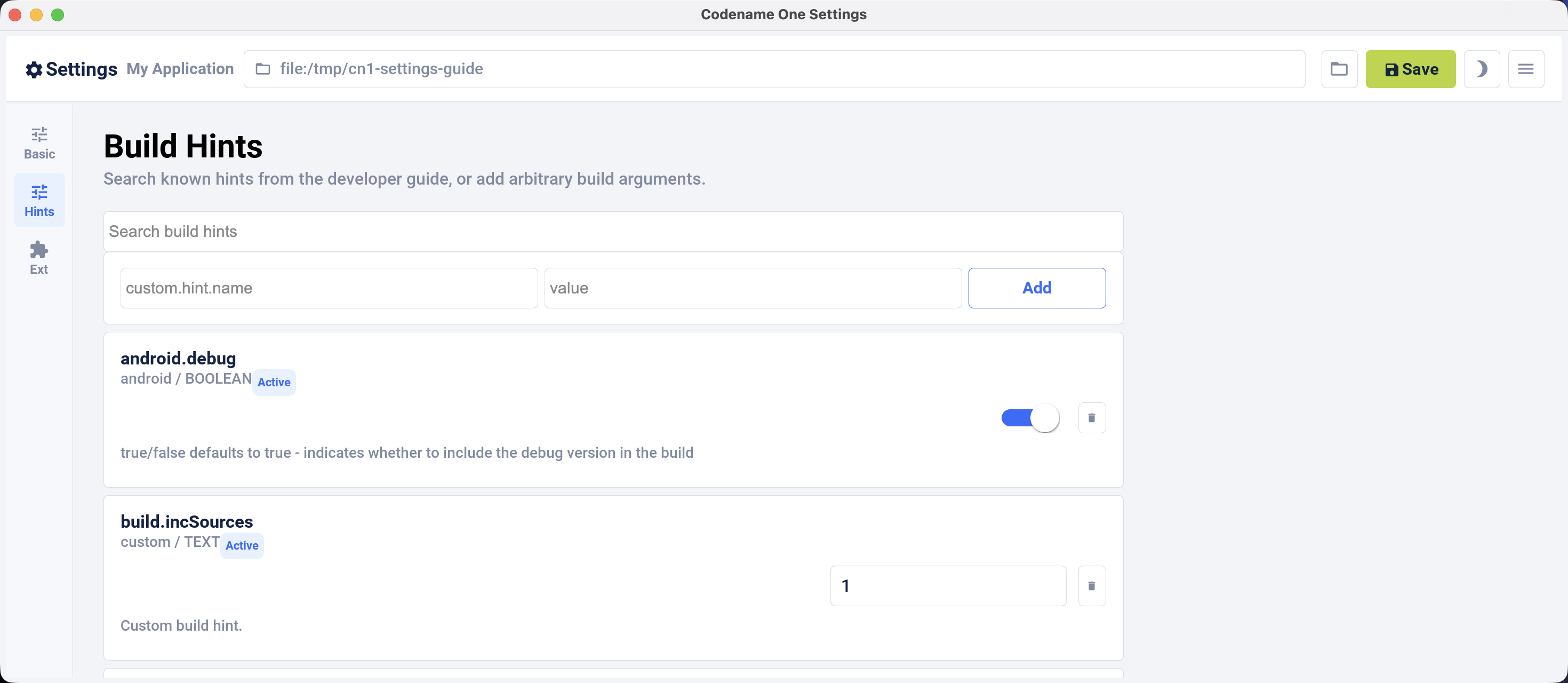
You can also set the build hints directly in the codenameone_settings.properties file. When you do that, each setting must start with the codename1.arg. prefix. For example, android.debug=true becomes codename1.arg.android.debug=true.
Application code can read a custom build argument through Display.getProperty():
class AppArgSnippet {
    public void readArgument() {
        String arg = Display.getInstance().getProperty("AppArg", null);
    }
}
The table below consolidates build hints across platforms from the annotations and build-hint catalog. It includes names, types, defaults, annotation forms, and descriptions, including aliases and open-ended hint families.
Most of the commonly used hints also have a compiler-checked form: an annotation
in com.codename1.annotations.buildhints that you put on the application’s main
class. Written that way a misspelled name is an unknown symbol and an
unsupported value is an unknown enum constant, instead of a properties line that
is accepted, never read, and has no effect. The Annotation column below
names that form where one exists. Setting the same hint both ways fails the
build.
Each annotation groups the hints of one platform, and the attribute names match
the part of the hint name after the prefix, so codename1.arg.ios.pods is
@Ios(pods = …):
@Android(themeMode = ThemeMode.MODERN, minSdkVersion = AndroidMinSdk.API_24)
@Build(nativeTheme = ThemeMode.MODERN)
@DesktopBuild(titleBar = DesktopTitleBar.NATIVE, width = 1280, height = 800)
@Ios(themeMode = ThemeMode.MODERN,
     newStorageLocation = Toggle.ON,
     pods = {"Intercom", "AFNetworking"})
public class BuildHintAnnotationSnippet {
}
That’s the same as writing these lines in codenameone_settings.properties:
codename1.arg.and.themeMode=modern
codename1.arg.android.min_sdk_version=24
codename1.arg.nativeTheme=modern
codename1.arg.desktop.titleBar=native
codename1.arg.desktop.width=1280
codename1.arg.desktop.height=800
codename1.arg.ios.themeMode=modern
codename1.arg.ios.newStorageLocation=true
codename1.arg.ios.pods=Intercom,AFNetworking
Three things in that example are worth calling out.
A hint whose value is a list takes a Java array, and the build joins it with the
separator that hint uses — a comma for ios.pods, so you never have to
remember which hint wants which delimiter.
A boolean hint takes Toggle, not boolean. Toggle.ON and Toggle.OFF say
what you want, and leaving the attribute out entirely means you have said
nothing, so the build service applies whatever it applies today. That’s why the
Default column reads (set by the build) for these hints: the annotation
records no default of its own, by design: a value compiled into your app can’t
follow the build service when the service changes it.
A hint with a closed set of values takes an enum, so @Ios(themeMode = …)
offers you the four themes that exist and rejects anything else at compile time.
Hints whose accepted values are open-ended stay String.
The long tail of hints has no annotation, and neither do the open-ended families
such as android.permission.<NAME>, because a Java annotation can’t express a
map. Set those in codenameone_settings.properties exactly as before. You can mix
the two forms in one project, as long as no single hint is declared in both.
Build hints are the one part of Codename One that doesn’t promise source compatibility, and that’s deliberate.
Everywhere else, code that compiles against one release keeps compiling against the next. Here, a hint that changes its name, its type or its accepted values is meant to stop compiling, so you find out at your desk. The alternative is what the properties file has always done: accept the line, never read it, and leave you with a build that succeeds and an app that doesn’t do what you asked.
The failure is always on the client side, never on the build service. A hint reaches the service as a name and a string, and the service goes on accepting the strings it always did — an app already built keeps building, and an older Codename One keeps talking to a newer service. A changed hint breaks a compile in your project, with the attribute named.
If a release does take an annotation away, the properties form of the same hint
still works, so the upgrade costs a line in codenameone_settings.properties
rather than being one you can’t take.
All build hints
| Name | Type | Default | Annotation | Description |
|---|---|---|---|---|
| string | (none) | (none) | Override alias of |
| string | (none) | (none) | Override alias of |
|
| (set by the build) |
|
|
| string |
| (none) | |
| boolean |
| (none) | |
| boolean |
| (none) | |
| string |
| (none) | |
| int |
| (none) | |
| string | (none) | (none) | |
| string |
| (none) | |
| string | (none) | (none) | |
| boolean |
| (none) | |
| string | (none) | (none) | |
| string |
| (none) | |
| string | (set by the build) |
| Allows explicitly setting the |
| string | (none) | (none) | |
| string | (none) | (none) | |
| string |
| (none) | Background color to use for adaptive icons when |
| string | (none) | (none) | Optional path (relative to the root of the native Android project) to an image file to use as the adaptive icon background when |
| boolean |
| (none) | |
| boolean |
| (none) | |
| int |
| (none) | |
| boolean |
| (none) | |
| boolean |
| (none) | |
| boolean |
| (none) | |
| boolean |
| (none) | |
| boolean | (set by the build) |
| Produces an Android App Bundle (.aab) rather than an APK. Required for new Play Store submissions. |
| version |
| (none) | |
| boolean |
| (none) | |
| string | (none) | (none) | |
| string | (none) | (none) | |
| boolean |
| (none) | Boolean true/false defaults to true. Toggles the Android pipeline between the legacy pipeline (false) and new pipeline (true) |
| boolean |
| (none) | |
| version |
| (none) | The Play Billing Library version an in-app-purchase app is built against, defaulting to 8.0.0. Codename One’s billing implementation uses the ProductDetails API, so 8.0.0 is also the minimum: Play Billing removed the older SkuDetails API, and a build set lower is refused with an explanation rather than a page of compiler errors. The default is the lowest version Google still accepts for new apps and updates, and the only one at that level whose library is content with |
| boolean |
| (none) | Boolean true/false defaults to false. Disables the external storage (SD card) permission |
| boolean |
| (none) | Boolean true/false defaults to false. Leaves |
| boolean | (none) | (none) | Boolean true/false, defaults to the value of |
| boolean |
| (none) | |
| boolean |
| (none) | |
| version | (set by the build) |
| Android build-tools version. It also selects the compile SDK, so there is no separate compile-SDK hint. |
| boolean |
| (none) | Whether the manifest declares |
| string | (set by the build) |
| Indicates whether the |
| version |
| (none) | |
| string | (none) | (none) | |
| version |
| (none) | |
| string | (none) | (none) | |
| string | (none) | (properties file only) | Numbered custom layout resources: android.cusom_layout1, android.cusom_layout2 and upward. The misspelling is load-bearing: it’s the key the builder actually reads, so correcting it drops the layout with no warning. |
| string | (none) | (none) | Applies to any number of layouts as long as they’re in sequence (for example, android.cusom_layout2, android.cusom_layout3 etc.). Will write the content of the argument as a layout XML file and give it the name |
| string |
| (none) | |
| version |
| (none) | |
| boolean | (set by the build) |
| Whether to include the debug version in the build. Left alone, this follows [#release] rather than a fixed value, so a build that selects neither still produces something installable. |
| string | (none) | (none) | |
| boolean |
| (none) | |
| boolean | (set by the build) |
| Turns off R8, falling back to the older shrinker. Note that hardening requires R8, so this conflicts with harden.level. |
| boolean |
| (none) | |
| boolean |
| (none) | |
| boolean |
| (none) | The Android counterpart of ios.documentProvider.enabled, and the supported way to declare the feature when the code that publishes lives in a cn1lib rather than in the app: the build’s usage scan reads the application’s own classes, so an app that only calls a library which publishes documents goes undetected. Falls back to ios.documentProvider.enabled when unset, so a project that sets one gets both. |
| boolean |
| (none) | Boolean true/false defaults to false. Enables Android adaptive icon generation in Android Gradle builds. When enabled, Codename One generates |
| boolean | (set by the build) |
| Boolean true/false defaults to true. Allows disabling the proguard obfuscation even on release builds, notice that this isn’t recommended |
| boolean |
| (none) | |
| boolean |
| (none) | |
| version |
| (none) | |
| string |
| (none) | Permissions for Facebook used in the Android build target, applicable only if Facebook native integration is used. |
| string | ` <files-path name="app_files" path="." /><external-files-path name="app_external_files" path="." /><external-cache-path name="app_external_cache" path="." /><external-path name="external" path="." />` | (none) | The FileProvider roots written into file_paths.xml, besides the cache/intent_files one the framework always needs. A file has to be under one of these for the application to hand it to another application — when sharing, or when dragging it out. Setting this replaces the default rather than adding to it. |
| boolean |
| (none) | |
| version |
| (none) | |
| string | (none) | (none) | |
| string | (none) | (none) | |
| boolean |
| (none) | |
| boolean |
| (none) | |
| string |
| (none) | |
| boolean | (none) | (none) | Boolean true/false defaults to false. If true, it will add verbose debug logs during frida detection to show which check if fails on. |
| boolean |
| (none) | Boolean true/false defaults to false. Indicates whether the app should check for the presence of the Frida dynamic instrumentation toolkit on the device. If Frida is detected, the app will exit. This uses the [frida-blocker](https://github.com/shannah/frida-blocker) library to perform the frida detection. |
| string | (none) | (none) | x.y.z The version of [frida-blocker](https://github.com/shannah/frida-blocker) to use to perform frida detection. This is only relevant if |
| boolean |
| (none) | |
| string | (none) | (none) | Allows integrating admob/google play ads, this is effectively identical to google.adUnitId but only applies to Android |
| string |
| (none) | Device key used to mark a specific Android device as a test device for Google Play ads defaults to C6783E2486F0931D9D09FABC65094FDF |
| boolean |
| (none) | Indicates whether the GPS permission should be requested, it’s autodetected by default if you use the location API. But, some code might want to explicitly define it |
| list (newline delimited) | (none) | (none) | |
| list ( | (set by the build) |
| Gradle dependency statements to add to the app module, such as implementation 'com.example:lib:1.0'. |
| list (newline delimited) | (none) | (none) | |
| string | (none) | (none) | Opts the build into Gradle 9. |
| boolean |
| (none) | |
| string |
| (none) | |
| string |
| (none) | |
| string | (none) | (none) | |
| boolean |
| (none) | |
| boolean |
| (none) | Boolean true/false defaults to false. When set to true it assumes the main class has two methods: |
| boolean |
| (none) | |
| string |
| (none) | |
| boolean |
| (none) | |
| string | (none) | (none) | |
| string | (none) | (none) | |
| string | (none) | (none) | |
| boolean |
| (none) | Boolean true/false defaults to false. Declares the |
| boolean | (set by the build) |
| Hides the Android status bar. |
| string |
| (none) | |
| string |
| (none) | |
| boolean |
| (none) | Deprecated, please android.playService.*! Indicates whether Google Play Services should be included into the build, defaults to false but that might change based on the functionality of the application and other build hints. Adding Google Play Services support allows you to use a more refined location implementation and invoke some Google specific functionality from native code. |
| boolean |
| (none) | |
|
| (set by the build) |
| Maps to android:installLocation manifest entry defaults to auto. Can also be set to internalOnly or preferExternal. |
| boolean |
| (none) | Whether the build injects the |
| list ( | (none) | (none) | Comma separated SHA-256 signing certificate fingerprints, in colon separated hex, enrolled in the shared |
| string | (none) | (none) | Accepted and ignored. A Java 6 source level was produced by running retrolambda over the compiled classes; retrolambda has been removed, so Android builds always use a Java 8 source level. Setting this to false logs a notice and changes nothing. |
| boolean |
| (none) | Boolean true/false defaults to true. Toggles the new async keyboard mode that leaves the keyboard open while you move between text components |
| boolean |
| (none) | Boolean true/false defaults to true. Kotlin 1.8.0 moved the contents of |
| boolean |
| (none) | |
| string | (set by the build) |
| The license key for the Android app, this is required if you use in-app purchase on Android |
| string | (none) | (none) | |
| string |
| (none) | Whether |
| string | (none) | (none) | Embeds XML content into the <queries> section of the Android manifest file. This is required in Android 11 for package visibility. See queries element Android documentation. |
| string | (none) | (none) | Android’s own native map provider, overriding |
| string | (none) | (none) | |
| boolean |
| (none) | |
|
| (set by the build) |
| The least SDK required to run this app, the default value changes based on functionality but can be as low as 7. This corresponds to the XML attribute |
| boolean |
| (none) | Boolean true/false defaults to true. Toggles the mock location permission which is on by default, this allows easier debugging of Android device location based services |
| string | (none) | (none) | |
| boolean | (set by the build) |
| Multidex lets an Android binary reference more than 65536 methods. Set [Toggle#OFF] to opt out, which builds a little faster and reinstates the limit. |
| boolean |
| (none) | Offers the |
| boolean |
| (none) | Offers the |
| boolean |
| (none) | Offers the |
| boolean | (set by the build) |
| Uses the current Firebase Cloud Messaging integration. Requires AndroidX and Gradle 8.13 or newer. |
| string | (none) | (none) | Comma delimited string of items that are non-consumable in the in-app purchase API |
| boolean |
| (none) | |
| string | (none) | (none) | |
| boolean | (set by the build) |
| Boolean true/false defaults to false. When |
| string | (none) | (properties file only) | true/false. Whether to include a particular permission. Preferred over android.xpermissions because it avoids conflicts with libraries. See Android’s Manifest.permission documentation for the full list. The optional .maxSdkVersion suffix becomes the maxSdkVersion attribute of the generated <uses-permission> tag, and .required marks the permission required. |
| boolean |
| (none) | |
| string | (none) | (none) | |
| version |
| (none) | |
| string | (none) | (properties file only) | Opts a single Google Play service in or out. The sibling <name>.minPlayServicesVersion pins its version. |
| boolean |
| (none) | |
| string | (none) | (none) | |
| boolean |
| (none) | |
| string | (none) | (none) | |
| string | (none) | (none) | |
| boolean |
| (none) | |
| boolean |
| (none) | |
| boolean |
| (none) | |
| boolean |
| (none) | |
| string | (none) | (none) | |
| boolean |
| (none) | |
| boolean |
| (none) | |
| string | (none) | (none) | |
| string | (none) | (none) | |
| boolean |
| (none) | |
| boolean |
| (none) | |
| boolean |
| (none) | |
| boolean |
| (none) | |
| boolean |
| (none) | |
| boolean |
| (none) | |
| boolean |
| (none) | |
| string | (none) | (none) | The version number of play services to build against. Experimental. Use with caution as building against versions other than the server default may introduce incompatibilities with some Codename One APIs. |
| list (newline delimited) | (set by the build) |
| Arguments for the keep option in proguard allowing you to keep a pattern of files for example, |
| string |
| (none) | |
| string | (none) | (none) | |
| string | (none) | (none) | Comma delimited long values to describe the push pattern of vibrate used for the |
| boolean | (set by the build) |
| true/false defaults to true - indicates whether to include the release version in the build |
| boolean |
| (none) | Boolean true/false defaults to false. Disables the built-in permissions specifically |
| list (newline delimited) | (set by the build) |
| Extra Gradle repositories to resolve dependencies from. |
| boolean |
| (none) | Boolean true/false defaults to false. Declares |
| boolean |
| (none) | Boolean true/false defaults to false. Indicates whether the app should check for root access on the device. If root access is detected, the app will exit. |
| version |
| (none) | |
| string | (none) | (none) | |
| string | (none) | (none) | Allows adding a manifest attribute for the sharedUserId option |
| string | (none) | (none) | Allows adding a manifest attribute for the sharedUserLabel option |
| boolean |
| (none) | Boolean true/false defaults to false. Used only in conjunction with android.enableProguard. Strips out unused resources to reduce apk size. Since 7.0 |
| boolean | (none) | (none) | true/false Default true. See https://source.android.com/docs/security/features/apksigning |
| boolean | (none) | (none) | true/false Default true. See https://source.android.com/docs/security/features/apksigning |
| boolean | (none) | (none) | true/false Default true. See https://source.android.com/docs/security/features/apksigning |
| boolean | (none) | (none) | true/false Default true. See https://source.android.com/docs/security/features/apksigning |
| boolean |
| (none) | Boolean true/false defaults to true. Corresponds to the |
| string | (none) | (none) | Size in bytes for the Android stack thread |
| boolean |
| (none) | true/false defaults to false. When set to true hides the status bar on Android devices. |
| string | (none) | (none) | |
| string | (none) | (none) | The mode in which the volume key should behave, defaults to OS default. Allows setting it to |
| string | (none) | (none) | Allows injecting more entries into the strings.xml file using a value that includes something like this |
| string | (none) | (none) | Allows injecting more data into the |
| string | (none) | (none) | |
| boolean | (none) | (none) | Boolean true/false defaults to false but that can change based on usage (for example, push implicitly activates this). Indicates whether the android support v4 library should be included in the build |
| list (newline delimited) | (none) | (none) | |
| int |
| (none) |
|
| boolean |
| (none) | |
| boolean |
| (none) | Boolean true/false defaults to false. Switches on tapjacking / screen-overlay protection at launch, so touches that arrive while another app’s window covers this one are detected and dropped. See the security chapter. |
| boolean |
| (none) | Boolean true/false defaults to true. Also asks Android 12+ to hide overlay windows drawn over the app, which is the only mitigation that covers native peer components, and declares the |
| string |
| (none) |
|
| int | (set by the build) |
| The Android SDK the build compiles against. Unset, the build server uses the highest platform it has installed, so leaving this alone tracks the server rather than pinning a number. Not every target works: the source may have limitations, and not all SDK targets are installed. |
| boolean |
| (none) | |
| string |
| (none) | Light or Dark defaults to Light. On Android 4+ the default Holo theme is used to render the native widgets sometimes and this indicates whether holo light or holo dark is used. This doesn’t affect the Codename One theme but that might change in the future. |
| list (newline delimited) | (set by the build) |
| Statements added to the top-level Gradle build file rather than the app module. |
| boolean |
| (none) | true/false (defaults to false). Marks the build as an Android TV / Google TV app. Adds the |
| boolean | (set by the build) |
| Use Android X instead of support libraries. This will also run a find/replace on all source files to replace support libraries and artifacts with AndroidX equivalents. |
| string | (none) | (none) | |
| string | (none) | (properties file only) | Adds a <uses-feature> element named by the suffix. |
| string | (none) | (properties file only) | Adds a <uses-permission> element named by the suffix. |
| string | (none) | (none) | Allows overriding the auto generated version number with a custom internal version number specifically used for the XML attribute |
| boolean |
| (none) | Boolean true/false defaults to true. Set to false to build the phone app alone in a companion build: the wearable link stays, no watch module is generated, and the phone output matches what it was before the watch app existed. |
| int | (none) | (none) | The wear module’s version code, stated outright. Play requires it to be higher than the phone’s, so a value other than a whole number above |
| int |
| (none) | How far above the phone’s version code the wear module’s sits when |
| boolean |
| (none) | |
| string |
| (none) | Version of |
| string |
| (none) | Version of |
| string |
| (none) | Version of the |
| string | (none) | (none) | |
| string |
| (none) | Version of |
| boolean |
| (none) | true/false defaults to false - set to true to hide the progress indicator that appears when loading a web page on Android. |
| version |
| (none) | |
| xml | (none) | (none) | Allows injecting more attributes into the |
| xml | (set by the build) |
| defaults to an empty string. Allows developers of native Android code to add text within the application block to define things such as widgets, services etc. |
| xml | (none) | (none) | Allows injecting more attributes into the |
| list (newline delimited) | (set by the build) |
| Arbitrary text spliced into the generated app-module Gradle file. |
| list (newline delimited) | (none) | (none) | |
| xml | (none) | (none) | Allows adding an intent filter to the main android activity |
| boolean |
| (none) | |
| string | (none) | (none) | |
| xml | (none) | (none) | |
| xml | (set by the build) |
| more permissions for the Android manifest |
| boolean | (set by the build) |
| Boolean true/false defaults to true. When set to true some values will ve implicitly doubled to deal with retina displays and icons etc. Will use higher DPI’s |
| string | (none) | (none) | Indicates the sizes in pixels for the system fonts as a comma delimited string containing 3 numbers for small,medium,large fonts. |
| boolean | (set by the build) |
| Starts the desktop build in full-screen mode. |
| int | (set by the build) |
| Height in pixels for the form in desktop builds, will be doubled for retina grade displays. Defaults to 600. |
| boolean | (set by the build) |
| Enables grab-able, click-to-page desktop scrollbars. |
| boolean | (set by the build) |
| Boolean true/false defaults to true. Indicates whether the UI in the desktop build is resizable |
| string | (none) | (none) | Name of the theme res file (without the ".res" extension) to use as the "native" theme. By default this is native indicating iOS theme on Mac and Windows Metro on Windows. If its something else then the app will try to load the file /themeName.res (placed in native/Java SE directory). |
| string | (none) | (none) | Same as |
| string | (set by the build) |
| Which native theme a desktop build installs, and the one hint that decides whether a desktop application looks like the platform it’s running on.
One desktop binary runs on Windows, macOS and Linux, so the value is resolved against the machine the application starts on rather than at build time. |
| string | (none) | (none) | Same as |
| string | (none) | (none) | |
|
| (set by the build) |
| How the desktop window is framed: native for the OS title bar and menu bar, custom for an undecorated window with a Codename One drawn title bar, or toolbar for the legacy in-app Toolbar. An unrecognized value falls back to native with a warning. |
| int | (set by the build) |
| Width in pixels for the form in desktop builds, will be doubled for retina grade displays. Defaults to 800. |
| boolean | (none) | (none) | Whether to use CEF for media and BrowserComponent instead of JavaFX in windows desktop builds. true/false. Default value is |
| string | (none) | (none) | Can be exe or msi depending on desired results |
| boolean |
| (none) | |
| string | (none) | (none) | |
| boolean | (none) | (none) | true/false flag defaults to false. By default Codename One applications register with the Codename One server. Setting this to true blocks them from sending information to the Codename One cloud, which is kept for statistical purposes and may be used to provide more installation stats in the future. |
| string | (none) | (none) | Pro/Enterprise only. Pins the cloud build to a specific released Codename One version using the Maven release scheme (for example |
| string | (none) | (none) | |
| string | (none) | (none) | |
| string | (none) | (none) | |
| boolean |
| (none) | Whether video calls are offered, on both platforms. |
| string | (none) | (none) | Deprecated alias for and.themeMode (AndroidGradleBuilder.java:4097). Both names configure one setting, so declaring this alongside @Android(themeMode) is a conflict. |
| string | (none) | (none) | |
| boolean |
| (none) | |
| string | (none) | (none) | |
| string |
| (none) | |
| boolean |
| (none) | |
| string | (none) | (none) | |
| string | (none) | (none) | |
| string | (none) | (none) | Deprecated alias for nativeTheme (AndroidGradleBuilder.java:4099, IPhoneBuilder.java:947). Both names configure one setting, so declaring this alongside @Build(nativeTheme) is a conflict. |
| string | (none) | (none) | Mac Native cloud builds only. The Mac bundle identifier registered in App Store Connect / Apple Developer. Distinct from |
| string | (none) | (none) | Mac Native cloud builds only. Path to the |
| secret | (none) | (none) | Mac Native cloud builds only. Password to unlock the P12 referenced by |
| string | (none) | (none) | Mac Native cloud builds only. Path to the Mac provisioning profile ( |
| string | (none) | (none) | |
| boolean |
| (none) | |
| string | (set by the build) |
| The application ID for an app that requires native Facebook login integration, this defaults to null which means native Facebook support shouldn’t be in the app |
| secret | (none) | (none) | The client token for an app that requires native Facebook login integration, this is required if the facebook.appId is set. |
| string | (set by the build) |
| The Android/chrome push identifier, see the push section for more details |
| string | (none) | (none) | Allows integrating Admob/Google Play ads into the application see this |
| list (newline delimited) | (none) | (none) | |
| string | (none) | (properties file only) | The whole hardening namespace is swept into the hardening engine’s configuration, so a hint added there reaches it without a dedicated reader. |
| string | (none) | (properties file only) | Enables or disables hardening for one platform slice. |
| boolean | (set by the build) |
| Permits a local or source build to run with hardening requested but not applied. Without it such a build is refused, so a hardened app is never shipped from a target that can’t actually harden it. |
|
| (set by the build) |
| Overrides control-flow obfuscation independently of harden.level. |
| boolean |
| (none) | |
| text_block | (set by the build) |
| Keep rules in ProGuard syntax, one per line, for classes that are resolved by name at runtime and so can’t be found by the automatic analysis. Same syntax as android.proguardKeep, so existing rules port directly. Rules are separated by newlines only, because a semicolon is legal inside a rule body such as { *; }. |
|
| (set by the build) |
| Master switch for app hardening: off, standard, aggressive or paranoid. An unrecognized value fails the build rather than being treated as off. |
| boolean |
| (none) | |
| boolean | (set by the build) |
| Overrides symbol renaming independently of harden.level. |
|
| (set by the build) |
| Overrides string obfuscation independently of harden.level: off, constants or all. |
| boolean |
| (none) | |
| boolean |
| (none) | |
| string |
| (none) | The host that serves Codename One invite links ( |
| string | (none) | (none) | This app’s path segment in its invite links ( |
| int |
| (none) | Valid values include 5 or 8. Indicates the JVM version that should be used for server compilation, this is defined by default for newly created apps based on the Java 8 mode selection |
| string | (none) | (none) | The JVM the should be bundled with Mac desktop build. Mac desktop builds only. Supported values: zuluFx8, zulu11, zuluFx11 |
| string | (none) | (none) | Selects the native map provider. |
|
| (set by the build) |
|
|
| string | (none) | (none) |
|
| boolean | (set by the build) |
| true/false (defaults to false). Blocks codename one from injecting its own resources when set to true, the only effect this has is in slightly reducing archive size. This might have adverse effects on some features of Codename One so it isn’t recommended. |
| int | (set by the build) |
| How long, in seconds, the instrumented application runs when |
| string | (none) | (none) | |
| string | (none) | (none) | |
| string | (none) | (properties file only) | Defines a variable that any other hint can interpolate as ${var.name}, with ${var.name:default} for a fallback. |
| boolean |
| (none) | |
| int |
| (none) | |
| string |
| (none) | |
| string |
| (none) | |
| string |
| (none) | |
| boolean |
| (none) | |
| int |
| (none) | |
| string | (none) | (none) | |
| string | (none) | (none) | |
| boolean |
| (none) | |
| string | (none) | (none) | This is a special case build hint. You can use any prefix to the build hint and the convention is to use your cn1lib name. It’s identical to |
| string | (none) | (properties file only) | Per-app-extension signing. ios.debug.appext.<Name>.* and ios.release.appext.<Name>.* are collapsed to unqualified keys before the request is sent. |
| string | (none) | (none) | |
| string | (none) | (properties file only) | Info.plist privacy strings. The commonly used keys are catalogued individually and exposed through @IosPrivacy; this entry covers the open tail that the builder sweeps by prefix. |
| string | (set by the build) |
| Why the app uses Bluetooth. Supplied automatically when the app references |
| string | (set by the build) |
| The pre-iOS 13 spelling of the Bluetooth usage description, supplied and overridable on the same terms. |
| string | (none) | (none) | |
| string | (set by the build) |
| The text iOS shows when the app first asks for the calendars full access. It becomes the |
| string | (set by the build) |
| The text iOS shows when the app first asks for the calendars. It becomes the |
| string | (set by the build) |
| The text iOS shows when the app first asks for the calendars write only access. It becomes the |
| string | (set by the build) |
| The text iOS shows when the app first asks for the camera. It becomes the |
| string | (set by the build) |
| The text iOS shows when the app first asks for the health share. It becomes the |
| string | (set by the build) |
| The text iOS shows when the app first asks for the health update. It becomes the |
| string | (set by the build) |
| The text iOS shows when the app first asks for the local network. It becomes the |
| string | (set by the build) |
| The text iOS shows when the app first asks for the location always and when in use. It becomes the |
| string | (set by the build) |
| The text iOS shows when the app first asks for the location always. It becomes the |
| string | (set by the build) |
| The text iOS shows when the app first asks for the location when in use. It becomes the |
| string | (set by the build) |
| The text iOS shows when the app first asks for the microphone. It becomes the |
| string | (set by the build) |
| The pre-iOS 16 spelling of the nearby-interaction usage description, supplied automatically when the app references the nearby APIs. |
| string | (set by the build) |
| Why the app measures distance and direction to nearby devices. Supplied automatically when the app references the nearby APIs; set it to say something more specific than the default. |
| string | (set by the build) |
| The text iOS shows when the app first asks for the reminders full access. It becomes the |
| string | (set by the build) |
| The text iOS shows when the app first asks for the reminders. It becomes the |
| string | (set by the build) |
| Why the app sends speech for recognition. Supplied automatically when the app references the speech APIs; set it to say something more specific. |
| string | (none) | (none) | iOS privacy flags for using certain APIs. Starting with Xcode 8, you’re required to add usage description strings for certain APIs. Find a full list of the available keys in Apple’s docs. Some relevant ones include |
| string | (none) | (none) | |
| string | (none) | (none) | |
| list ( | (set by the build) |
| A semicolon separated list of libraries that should be linked to the app to build it |
| string | (none) | (none) | Objective-C code that can be injected into the iOS app delegate at the bottom of the body of the didFinishLaunchingWithOptions callback method |
| boolean |
| (none) | |
| string | (none) | (none) | |
| string | (none) | (none) | |
| string | (none) | (none) | Space-delimited list of app groups that this app belongs to as described in Apple’s documentation. These are added to the entitlements file with key |
| string | (none) | (none) | Cloud device builds only. URL of the provisioning profile for a generic app extension dropped into |
| string | (none) | (none) | Objective-C code that can be injected into the iOS callback method (message) |
| list ( | (set by the build) |
| Comma separated list of url schemes that |
| boolean | (none) | (none) | true/false (defaults to false). Indicates whether the application should exit on home button press. The default is to exit, leaving the application running is only tested at the moment. |
| string | (none) | (none) | Comma-delimited list of domains associated with this app. Each domain should be prefixed by a supported prefix. For example, "applinks:" or "webcredentials:." See Apple’s documentation on Associated domains for more information. |
| string | (none) | (none) | |
| string | (none) | (none) | |
| text_block | (set by the build) |
| Objective-C code that can be injected into the iOS app delegate at the top of the body of the didFinishLaunchingWithOptions callback method |
| boolean |
| (none) | true/false defaults to false. Enables bitcode support for the build. |
| boolean |
| (none) | true/false (defaults to false). Indicates that app should prevent iOS from taking screenshots when app enters background. Described here. |
| string | (none) | (none) | |
| string |
| (none) | |
| version | (set by the build) |
| Indicates the version number of the bundle, this is useful if you want to create a minor version number change for the beta testing support |
| string | (none) | (none) | The App Group the call directory extension shares with the app. The extension runs in its own process, so the blocked-number list is handed over through the group rather than passed in. Defaults to |
| string | (none) | (properties file only) | Xcode build settings for the generated call directory extension target. PRODUCT_BUNDLE_IDENTIFIER is read in two places — the target’s own settings and the CN1CallDirectoryExtensionIdentifier the host plist carries — so an override has to reach both or the app asks the system to reload an identifier nothing installed. |
| string | (none) | (none) | A template image in the bundle shown beside the call in the system UI. |
| string | (none) | (none) | The name shown above a call in the system call UI. Defaults to the app’s display name. Baked into |
| int |
| (none) | Seconds a pushed call waits for your code before the system ends it as unanswered. |
| boolean |
| (none) | Whether calls appear in the system call log. |
| string | (none) | (none) | A sound file in the bundle to ring incoming calls with. Defaults to the system ringtone. |
| string | (none) | (none) | The name shown when a VoIP push carries no |
| boolean |
| (none) | Whether the provider offers video calls. Overrides |
| boolean |
| (none) | |
| boolean |
| (none) | |
| boolean |
| (none) | |
| boolean |
| (none) | |
| boolean | (none) | (none) | Whether this project wants the iCloud key-value store behind com.codename1.continuity.sync. Left unset the build decides from the bytecode, which is usually what you want. Set false when the App ID has no iCloud capability and the app can live without a synced store: the entitlement is dropped and SyncedStore reports itself unsupported at runtime rather than the build failing to sign. Set true to say so explicitly, which is what lets the signing preflight check the profile before the build is sent. Handing work to a nearby device is unaffected either way — that half needs no entitlement. |
| boolean |
| (none) | |
| boolean |
| (none) | |
| boolean |
| (none) | Whether AES-GCM is compiled into the crypto library. On by default wherever the crypto API is used; set false to leave it out and keep the binary smaller. The secure vault needs it. |
| string | (none) | (none) | Can be set to "armv7" to force iOS debug builds to be 32 bit. By default, debug builds are 64 bit only. |
| string | (none) | (none) | Specifies distribution type for debug iOS builds only. This is used for enterprise or ad-hoc builds (using values "enterprise" and "ad-hoc" respectively). |
| string | (none) | (none) | Specifies the team ID associated with the iOS debug provisioning profile and certificate. |
| boolean |
| (none) | |
|
| (set by the build) |
| Which native dependency manager to use: auto picks one from whichever of ios.pods and ios.spm.packages is set, and cocoapods, spm or both require the matching hint to be set. An unrecognized value fails the build. |
| version | (set by the build) |
| Minimum iOS version the build targets. Set it to the lowest iOS you actually support; a higher value excludes older devices from the App Store listing. |
| boolean |
| (none) | true/false (defaults to false). When true, the iOS app will exit on launch if it detects that it’s running on a jailbroken device. |
| string | (none) | (none) | |
| boolean |
| (none) | |
| string | (none) | (none) | Specifies distribution type for debug iOS builds. This is used for enterprise or ad-hoc builds (using values "enterprise" and "ad-hoc" respectively). |
| string | (none) | (none) | App Group id starting with 'group.' shared by the app and the generated CN1Documents extension, defaulting to 'group.' followed by the app’s package name. This id carries everything the two processes share: the app publishes its index into the group and the extension reads it from there, so without it the published location appears empty. |
| string | (none) | (properties file only) | Overrides an Xcode build setting for the generated document provider extension. Applied last, so it wins over the generated defaults. |
| version |
| (none) | Minimum OS version the generated extension runs on. At or above 16.0 the extension is an NSFileProviderReplicatedExtension; below it Codename One generates the deprecated NSFileProviderExtension instead. The host app’s own deployment target is unaffected. |
| string | (none) | (none) | Name shown for this location in the file browser. Defaults to the app’s display name. |
| boolean |
| (none) | Declares that this project publishes documents to the system file browser. The build detects a reference to com.codename1.documents on its own, so this is redundant for the build itself; it exists because the Certificate Wizard and the signing preflight work without reading bytecode and need to know that the CN1Documents extension will be generated. |
| boolean |
| (none) | Set false to skip the iOS lowering entirely — no extension target, no app group, no plist keys — leaving com.codename1.documents an inert no-op at runtime. |
| boolean |
| (none) | Boolean true/false defaults to false. Makes videos "autoplay" when loaded on iOS |
| boolean |
| (none) | Boolean true/false defaults to true. Clears the badge value with every load of the app, this is useful if the app doesn’t manually keep track of number values for the badge |
| boolean |
| (none) | |
| boolean |
| (none) | |
| string | (none) | (properties file only) | Adds an arbitrary entitlement key to the generated entitlements file. |
| string | (none) | (none) | |
| string | (none) | (none) | |
| boolean |
| (none) | |
| string | (none) | (none) | |
| string | (none) | (none) | |
| string | (none) | (none) | |
| string | (none) | (none) | |
| xml | (none) | (none) | Content to inject into the iOS entitlements file. This should be in the Plist XML format. See Apple Entitlements Documentation. |
| boolean |
| (none) | |
| string |
| (none) | |
| string | (none) | (none) | Permissions for Facebook used in the Android build target, applicable only if Facebook native integration is used. |
| boolean |
| (none) | |
| boolean |
| (none) | |
| boolean |
| (none) | |
| boolean |
| (none) | |
| string | (none) | (none) | |
| boolean |
| (none) | |
| string | (none) | (none) | Objective-C code that can be injected into the iOS app delegate within the body of the file before the end. This only makes sence for methods that aren’t already declared in the class |
| text_block | (set by the build) |
| Objective-C code that can be injected into the iOS app delegate at the top of the file. For example, if you need to include headers or make special imports for other injected code |
| string | (none) | (none) | Allows integrating admob/google play ads, this is effectively identical to google.adUnitId but only applies to iOS |
| string | (none) | (none) | Indicates the amount of padding to pass to the Google Ads placed at the bottom of the screen with |
| string |
| (none) | |
| string | (none) | (none) | |
| string | (none) | (none) | |
| boolean |
| (none) | Boolean true/false defaults to false. When set to true it assumes the main class has two methods: |
| boolean |
| (none) | |
| boolean |
| (none) | |
| boolean |
| (none) | |
| string | (none) | (none) | |
| boolean |
| (none) | |
| string | (none) | (properties file only) | Overrides an Xcode build setting for the Matter commissioning extension. |
| string | (none) | (none) | |
| string | (none) | (none) | |
| string |
| (none) | |
| boolean |
| (none) | |
| boolean |
| (none) | |
| boolean | (set by the build) |
| true/false (defaults to false). Whether to include the push capabilities in the iOS build. Notice that the IDE plugin has an "Include Push" check box you should use under the iOS section. |
| boolean |
| (none) | |
| string | (none) | (none) | |
| string | (set by the build) |
| UIInterfaceOrientationPortrait by default. Indicates the orientation, one or more of (separated by colon :): |
| boolean |
| (none) | Whether the build generates and embeds the App Clip that makes invite attribution exact on iOS. The App Store carries no referrer of its own, so without the clip an iOS install can’t be attributed at all. Set it to THE HANDOFF, for a clip of your own. Write one entry into the Then call Don’t clear the entry after writing it. The installed app reads it, keeps it until its own record is durable, and clears it then; a clip that clears its own copy destroys the code whenever that write fails or the process exits first, and the install is then reported as organic permanently. |
| string | (none) | (none) | The app group the invite App Clip hands the invite code to the installed app through. Defaults to |
| string | (none) | (none) | The numeric App Store identifier of this app, which the invite App Clip uses to offer the full app through |
| string | (none) | (properties file only) | Xcode build settings for the generated invite App Clip target. The clip is a separate application bundle embedded in the app, so its deployment target and device family are its own and an override reaches only it. |
| boolean |
| (none) | Whether the build appends |
| boolean |
| (none) | Flips between iOS keyboard open mode and autofold keyboard mode. Defaults to true which means the keyboard will remain open and not fold automatically when editing moves to another field. |
| string | (none) | (none) | Space-delimited list of keychain access groups that this app has access to as described in Apple’s documentation. These are added to the entitlements file with the key |
| boolean |
| (none) | |
| string | (none) | (none) | This flag is required for iOS 8 and newer if you’re using the location API. It needs to include a description of the reason for which you need access to the users location |
| boolean |
| (none) | |
| string | (none) | (none) | iOS’s own native map provider, overriding |
| string |
| (none) | Selects the |
| version | (set by the build) |
| The null and empty-string reads of this hint are presence checks; 6.0 is the substantive one. |
| string |
| (none) | |
| string | (none) | (none) | |
| string |
| (none) | |
| string | (none) | (none) | |
| boolean |
| (none) | Set to true to enable iOS multitasking and split-screen support. This only works if |
| string | (none) | (none) |
|
| list ( | (none) | (none) | Bluetooth service UUIDs published as |
| boolean |
| (none) | Requests the nearby-interaction entitlement and the background mode that go with ranging while backgrounded. Off by default because the entitlement has to be on the provisioning profile, and requesting it without one fails signing for every ranging app. |
| string | (none) | (none) | Bonjour service type the nearby transport advertises. Derived from the package name when unset. |
| boolean | (set by the build) |
| Stores app files under the documents directory rather than caches, which is the location Apple recommends but which may break compatibility with an app that already shipped. Described in this issue |
| boolean |
| (none) | |
| boolean |
| (none) | |
| boolean |
| (none) | true/false (defaults to false). Backward-compatibility flag for the pre-issue-#4876 behavior. By default, the iOS notification permission prompt is deferred until the app calls |
| boolean | (set by the build) |
| Added the |
| boolean | (set by the build) |
| Boolean true/false defaults to false. When |
| string | (set by the build) |
| Hostname or IP address the device-side listener dials to reach the desktop proxy. Default |
| int | (set by the build) |
| TCP port on |
| boolean | (set by the build) |
| Boolean true/false defaults to false. When |
| xml | (none) | (none) | |
| string |
| (none) | |
| boolean | (set by the build) |
| Cloud builds only, Pro plan and above. Profile-guided optimization: compiles the application twice. An instrumented build runs unattended on an iOS simulator for |
| xml | (set by the build) |
| entries to inject into the iOS plist file during build. |
| list ( | (set by the build) |
| A comma separated list of Cocoa Pods that should be linked to the app to build it. For example, |
| string | (none) | (properties file only) | Overrides an Xcode build setting for the generated CocoaPods project. |
| string | (none) | (none) | |
| string | (none) | (none) | |
| version | (set by the build) |
| Sets the Cocoapods 'platform' for the Cocoapods. Some Cocoapods require a minimum platform level. For example, |
| list ( | (set by the build) |
| Extra CocoaPods spec repositories to search, in addition to the default trunk. |
| boolean |
| (none) | |
| boolean | (set by the build) |
| true/false defaults to false. The iOS build process adapts the submitted icon for iOS conventions (adding an overlay) that might not be appropriate on some icons. Setting this to true leaves the icon unchanged (only scaled). |
|
| (set by the build) |
| one of ios, ipad, iphone (defaults to ios). Indicates whether the resulting binary is targeted to the iphone only or ipad only. Notice that the IDE plugin has a "Project Type" combo box you should use under the iOS section. |
| string | (none) | (none) | Can be set to "arm64" to only build iOS release builds for 64 bit. By default, release builds are both 32 and 64 bit. |
| string | (none) | (none) | Specifies distribution type for release iOS builds only. This is used for enterprise or ad-hoc builds (using values "enterprise" and "ad-hoc" respectively). |
| string | (none) | (none) | Specifies the team ID associated with the iOS release provisioning profile and certificate. |
| string | (none) | (none) |
|
| string | (none) | (none) | |
| list ( | (set by the build) |
| Swift Package Manager packages to link, one per entry, each written as identity|url|requirement. |
| string | (none) | (properties file only) | Selects which products of a Swift Package Manager package to link, keyed by package identity. |
| string | (none) | (none) | |
| boolean | (none) | (none) | true/false defaults to false. Hides the iOS status bar if set to true. |
| boolean |
| (none) | |
| string | (none) | (none) | |
| string | (none) | (properties file only) | Overrides an Xcode build setting for the external-surfaces extension. |
| version |
| (none) | |
| boolean |
| (none) | |
| boolean |
| (none) | |
| version |
| (none) | |
| string | (set by the build) |
| Specifies the team ID associated with the iOS provisioning profile and certificate. Use |
| boolean | (none) | (none) | Boolean true/false defaults to false and works only for pro accounts. Enables the testflight support in the release binaries for easy beta testing. Notice that the IDE plugin has a "Test Flight" check box you should use under the iOS section. |
|
| (set by the build) |
|
|
|
| (set by the build) |
|
|
| boolean |
| (none) | |
| boolean |
| (none) | |
| string | (set by the build) |
| Allows intercepting a URL call using the syntax |
| string | (none) | (none) | |
| boolean |
| (none) | Use AVKit for video components on iOS rather than |
| boolean |
| (none) | |
| boolean |
| (none) | |
| boolean |
| (none) | |
| boolean |
| (none) | |
| boolean |
| (none) | |
| string | (none) | (none) | Objective-C code that can be injected into the iOS callback method (message) |
| string | (none) | (none) | |
| boolean |
| (none) | Generates the iOS packet tunnel: a Network Extension carrying a virtual machine, running the |
| string | (none) | (properties file only) | Xcode build settings for the generated packet tunnel extension target. PRODUCT_BUNDLE_IDENTIFIER is read in two places — the target’s own settings and the CN1VpnTunnelExtensionIdentifier the host plist carries, which is how the app names the provider it starts — so an override has to reach both or the app asks the system to start an extension installed under some other name. |
| string | (none) | (none) | Which |
| string | (none) | (none) | App Group id starting with |
| string | (none) | (none) | HTTPS URL the generated login UI extension POSTs |
| boolean |
| (none) | Boolean true/false defaults to false. Generates an Apple Wallet issuer provisioning extension (the "From apps on your iPhone" flow in the Wallet app) and embeds it in the build. Requires |
| string | (none) | (none) | Swift injected at the generate-request marker of the non-UI Wallet extension. |
| string | (none) | (none) | Swift injected at the generate-response marker of the non-UI Wallet extension. |
| boolean |
| (none) | Boolean true/false defaults to false. Also generates the Wallet authorization UI extension - a login form shown inside the Wallet app when the app reports that authentication is required. Requires |
| string | (none) | (none) | HTTPS URL of the issuer backend endpoint that produces the encrypted provisioning payload. The generated extension POSTs Apple’s certificates/nonce plus the card identifier and auth token there as JSON. Required when |
| string |
| (none) | |
| string | (none) | (none) | Extra |
| string | (none) | (none) | Swift injected where the non-UI Wallet extension lists its pass entries. |
| string | (none) | (none) | Swift injected where the non-UI Wallet extension lists its remote pass entries. |
| string | (none) | (none) | Swift injected at the status marker of the non-UI Wallet extension. |
| string | (none) | (none) | Swift injected at the auth-request marker of the UI Wallet extension. |
| string | (none) | (none) | Swift injected at the auth-response marker of the UI Wallet extension. |
| string |
| (none) | |
| string | (none) | (none) | Extra |
| string | (none) | (none) | Swift injected into |
|
| (set by the build) |
| Which Xcode the build server compiles with.
Unset lets the server choose: it prefers its own default and falls back to the newest Xcode it carries, so a server that hasn’t been re-imaged keeps building. Naming one opts out of that fallback — a version the server doesn’t have fails the build rather than substituting a toolchain nobody asked for, which would archive against an unintended SDK with nothing in the log to say so.
Builds are claimed off a shared queue, so an Xcode that some servers carry and others don’t makes a build pass or fail at random. That’s a fleet out of step and worth reporting, not a hint to tune.
The constants are the majors a current build server image carries, a set that belongs to the image rather than to this framework. To name a version outside them — a minor such as |
| boolean |
| (none) | |
| boolean |
| (none) | true/false (defaults to |
| boolean |
| (none) | true/false (defaults to |
| string |
| (none) | The native theme a desktop browser gets. |
| boolean |
| (none) | |
| string | (none) | (none) | Content to be injected into the index.html file at the end of the |
| string | (none) | (none) | Content to be injected into the index.html file at the beginning of the |
| boolean |
| (none) | true/false (defaults to |
| boolean | (none) | (none) | true/false (defaults to |
| string | (none) | (none) | An explicit native theme resource, such as |
| string | (none) | (none) |
|
| string | (none) | (none) | |
| string | (none) | (none) | Comma-separated target origins, host names, or wildcard subdomains that a generated proxy may access, for example |
| string |
| (none) | The generated ParparVM proxy deployment platform. Supported values are |
| string | (none) | (none) | The URL of an existing proxy to use for network requests. Setting it suppresses generated proxy packaging unless |
| boolean |
| (none) | true/false (defaults to |
| boolean | (none) | (none) | true/false (defaults to |
| boolean | (none) | (none) | true/false (defaults to |
| string | (none) | (none) | (Optional) The version of TeaVM to use for the build. Use caution, only use this property if you know what you’re doing! |
| boolean |
| (none) | true/false (defaults to |
| string |
| (none) | How a desktop native theme presents the form title and commands in a browser. |
| string | (none) | (none) | |
| string | (none) | (none) | |
| boolean |
| (none) | |
| string |
| (none) | |
| boolean |
| (none) | |
| boolean |
| (none) | |
| string | (none) | (none) |
|
| boolean |
| (none) | Cloud builds only, Pro plan and above. true/false. Profile-guided optimization for the native Linux build: an instrumented binary runs unattended on the build host for |
| string | (none) | (none) | |
| boolean | (none) | (none) | Whetherto use CEF for media or BrowserComponent instead of JavaFX in Mac desktop builds. true/false. Default value is |
| string | (none) | (none) | Mac Native builds only. |
| string | (none) | (none) | Mac Native builds only. Used only when |
| string | (none) | (none) | Mac Native builds only. |
| boolean |
| (none) | Mac Native builds only. |
| string |
| (none) | Mac Native builds only. |
| boolean |
| (none) | |
| string | (none) | (none) | Mac Native builds only. |
| string | (none) | (none) | Mac Native builds only. |
| boolean | (none) | (none) | Sandboxed Mac Native builds only. Toggles |
| boolean | (none) | (none) | Sandboxed Mac Native builds only. Toggles |
| string | (none) | (none) | Mac Native builds only. Free-form XML inserted verbatim inside the |
| string |
| (none) | Mac Native builds only. |
| string | (none) | (none) | Mac Native builds only. |
| string | (none) | (none) | Mac Native builds only. Toggles |
| string | (none) | (none) | Mac Native builds only. Toggles |
| boolean | (none) | (none) | Sandboxed Mac Native builds only. Toggles |
| string | (none) | (none) | Mac Native builds only. Opt-in. Format |
| version |
| (none) | Mac Native builds only. iOS deployment-target floor for the Catalyst slice ( |
| version |
| (none) | Mac Native builds only. Minimum macOS version ( |
| boolean |
| (none) | Mac Native builds only. Declares that the app uses |
| boolean |
| (none) | |
| string | (none) | (none) | |
| string | (none) | (none) | |
| secret | (none) | (none) | |
| string | (none) | (none) | |
| string | (none) | (properties file only) | Per-profile provisioning data for a native macOS build, keyed by profile name. |
| string | (none) | (none) | Mac Native builds only. Provisioning profile name for App Store distribution — used only when |
| string | (none) | (none) | Mac Native builds only. Provisioning profile name for Developer ID distribution — used only when |
| string |
| (none) | Mac Native builds only. |
| string |
| (none) | Mac Native builds only. Signing certificate identity for the App Store channel. Default |
| string |
| (none) | Mac Native builds only. Signing certificate identity for the Developer ID channel. Default |
| string | (none) | (none) | Mac Native builds only. Apple Developer Team ID (alphanumeric). Falls back to |
| list ( | (set by the build) |
| macOS builds. Frameworks to link in addition to the ones the build detects for itself, separated by a semicolon, a comma or a colon — for example |
| string | (set by the build) |
| macOS builds. |
| string | (set by the build) |
| macOS builds. The architectures to compile, as an |
| string | (set by the build) |
| macOS builds. Used only when |
| string | (set by the build) |
| macOS builds. |
| string | (set by the build) |
| macOS builds. The Xcode configuration to archive, as passed to |
| string | (set by the build) |
| macOS builds. |
| boolean | (set by the build) |
| macOS builds. Whether AES-GCM is compiled into the bundled crypto library. On by default wherever the crypto API is on, matching what an iOS build of the same application gets; set |
| boolean | (set by the build) |
| macOS builds. |
| string | (set by the build) |
| macOS builds. Every |
| boolean | (set by the build) |
| macOS builds. |
| boolean | (set by the build) |
| macOS builds. |
| string | (set by the build) |
| macOS builds. Free-form XML inserted verbatim inside the |
| boolean | (set by the build) |
| macOS builds. |
|
| (set by the build) |
| macOS builds. |
| boolean | (set by the build) |
| macOS builds. |
| boolean | (set by the build) |
| macOS builds. Toggles |
| boolean | (set by the build) |
| macOS builds. Toggles |
| string | (set by the build) |
| macOS builds. Opt-in. Format |
| boolean | (set by the build) |
| macOS builds. Sets Xcode’s |
| boolean | (set by the build) |
| macOS builds. |
| string | (set by the build) |
| macOS builds. Minimum macOS version ( |
| string | (set by the build) |
| macOS builds. |
| boolean | (set by the build) |
| macOS cloud builds only, Pro plan and above. Profile-guided optimization: an instrumented application runs unattended on the build host for |
| string | (set by the build) |
| macOS builds. Raw XML members added to the generated |
| string | (set by the build) |
| macOS builds. Provisioning profile name for App Store distribution — used only when |
| string | (set by the build) |
| macOS builds. Provisioning profile name for Developer ID distribution — used only when |
| string | (set by the build) |
| macOS builds. |
| string | (set by the build) |
| macOS builds. Signing certificate identity for the App Store channel. Default |
| string | (set by the build) |
| macOS builds. Signing certificate identity for the Developer ID channel. Default |
| string | (set by the build) |
| macOS builds. The certificate |
| string | (set by the build) |
| macOS builds. The installer certificate for the App Store channel specifically, when |
| string | (set by the build) |
| macOS builds. The installer certificate for the Developer ID channel specifically. Unset, the shared |
| boolean | (set by the build) |
| macOS builds. |
| string | (set by the build) |
| macOS builds. Apple Developer Team ID (alphanumeric). Falls back to |
| string | (set by the build) |
| macOS builds. Which native theme the application installs: |
| string | (set by the build) |
| macOS builds. Custom URL schemes to register, comma separated. |
| string | (none) | (none) | Bundle identifier of the tvOS app. Defaults to |
| string | (none) | (none) | The tvOS app name shown on Apple TV. Defaults to the app’s display name. |
| boolean |
| (none) | true/false (defaults to false). Adds an Apple TV (tvOS) application target to the iOS build. The tvOS app is a separate |
| string | (none) | (none) | |
| version |
| (none) |
|
| string | (none) | (none) | Apple Developer Team ID used to sign the tvOS target. Falls back to the iOS team id ( |
| boolean |
| (none) | |
| string | (none) | (none) | |
| boolean |
| (none) | |
| string | (none) | (none) | |
| string |
| (none) | Deployment target of the WidgetKit extension that carries the watch complication. This is the WATCH APP’s floor rather than the extension’s own: WidgetKit reaches back to watchOS 9, but the extension is embedded in the watch app, so advertising a version the app itself refuses to install on claims support the user never gets. |
| string | (none) | (none) | The JVM that should be bundled in the Windows desktop build. Windows desktop builds only. Supported values: zulu8, zuluFx8, zulu8-32bit, zuluFx8-32bit, zulu11, zuluFx11, zulu11-32bit, zuluFx11-32bit |
| string | (none) | (none) | Windows desktop builds only. Overrides the default installation folder name suggested by the installer (under |
| string | (none) | (none) | Windows desktop builds only. Overrides the name used for the Start Menu shortcut, the Desktop shortcut and (when |
| boolean | (none) | (none) | true/false (defaults to false). Forces windows desktop builds to use the Win32 JVM instead of the 64 bit VM making them compatible with older Windows Machines. This is off by default at the moment because of a bug in JDK 8 update 112 that might cause this to fail for some cases |
| string | (none) | (none) | Native Windows port only (the |
| boolean |
| (none) | |
| boolean |
| (none) | Native Windows port only. true/false (defaults to false). When |
| string | (none) | (none) | Historical build hint for the discontinued UWP target. It’s retained here only for legacy reference and isn’t used by current supported build targets. |
| boolean |
| (none) | |
| string | (none) | (none) | |
| secret | (none) | (none) | |
| string | (none) | (none) | |
| string | (none) | (none) | |
| string | (none) | (none) | |
| string | (none) | (none) |
|
| string | (none) | (none) | Native Windows port only; used when building on a non-Windows host (for example a Linux build server). Path to a Windows SDK laid out by |
| boolean |
| (none) | Native Windows port only. |
| string |
| (none) | Native Windows port only. Signature digest algorithm. Default |
| string | (none) | (none) | |
| secret | (none) | (none) | |
| string | (none) | (none) | |
| string | (none) | Native Windows port only. RFC 3161 timestamp server used when signing, so the signature stays valid after the certificate expires. Default | |
| string | (none) | (none) |